Options. Authentication settings
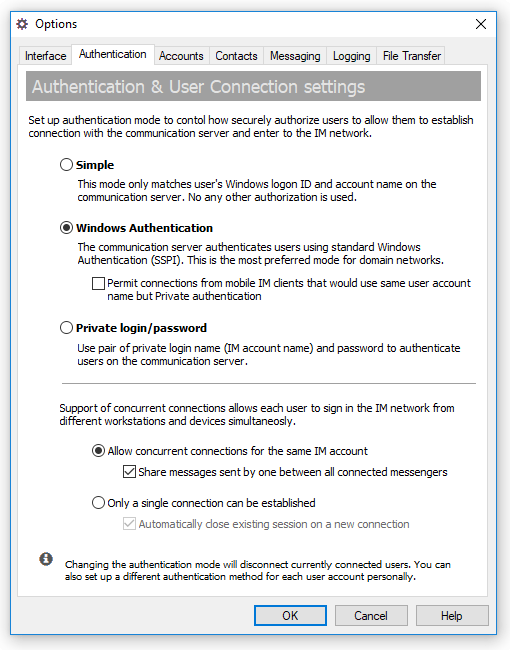
The Authentication tab of the Options dialog box allows you to set up authentication mode and contol how securely authorize users to allow them to establish connection with the communication server and enter to the IM network.
To open the Options dialog box click the  button on the toolbar or select the "Tools\Options..." item from the main menu or use the Ctrl+O hotkey.
 |
| Authetication settings |
- "Simple" — This mode only matches user's Windows logon ID and account name on the communication server. No any other authorization is used.
- "Windows Authentication" — The communication server authenticates users using standard Windows Authentication (SSPI). This is the most preferred mode for domain networks.
- "Permit connections from mobile IM clients that would use same user account name but Private authentication" — This option allows to accept users connected from mobile messengers such as IM client for Android platform even when Windows Authentication is enabled. The option permits to use the same account name on different devices on domain environment instead of creation of a separate account for the user that would be used by the Android app.
Since our mobile clients do not support authentication on Microsoft domain networks at this time then they would use Private login/password authentication instead. In this case desktop users will be authorized via standard Windows Authentication (SSPI) but connections from mobile devices for the same account name will be handled via third-party authentication. Password used from mobiles can be different from user's login password in the Active Directory catalog.
- "Private login/password" — Use pair of private login name (IM account name) and password to authenticate users on the communication server.
 |
Changing the authentication mode will disconnect all currently connected users to the server. Messaging clients will automatically reconnect to the IM server within 60 seconds or less using the new authentication mode. |
|
You can also set up a different authentication method for each user account personally in each user's property dialog. |
You can also set additional options related to user connections that do not depend on chosen authentication mode:
- "Allow concurrent connections for the same IM account" — Enable this option if you want to accept concurrent connections for the same IM account. The server will accept two or more users that connect and enter to the IM network under the same account name from differect computers/locations/devices. All messages to that IM account name such as private, group and news messages will be delivered to all connected users with the same name.
- "Share messages sent by one between all connected messengers" — If concurrent connections from the same IM account are allowed then you can enable forwarding sent messages to all other users with the same account name currently connected to the communication server.
- "Only a single connection can be established" — In opposite to the radiobutton above enabling this option will support only a single connection to the insant messaging server made under the same user account.
- "Automatically close existing session on a new connection" — By default the IM server does not accept a new connection if there is already connected user on the IM network under the same account name. Sometimes it is required to get the same user connected from new location/device even he has an established session from somewhere. In those cases check this option that would disconnect existing (first) session and accept the new one.
|
For example, 2 users, A and B with the "Administrator" account name are connected to the IM server from different computers. One of them (user A) sends an instant message to some user or on messaging group. That message will be also shown in the conversation dialog and Message History on another user (user B) even the message has been sent from another PC. |



 Facebook page
 Síganos en Twitter
 YouTube channel
 Lea nuestras noticias y blog